How to transform your data to generate insights is one of the most essential skills a Data Scientist can have. Knowing state-of-the-art models will be of no use if you cannot transform your data with ease. Pandas is a data manipulation library in python that everyone knows. It is so ubiquitous that all of us starting off in Data Science start our notebooks with import pandas as pd.
In this post, we will go over some pandas skills that many people either don’t know, don’t use or find difficult to understand.
As usual, you can either read the post or watch the Youtube video below.
We will be using the flights data from seaborn as an example to go over.
import pandas as pd
import numpy as np
import seaborn as sns
flights = sns.load_dataset('flights')
flights.head()

Pivot and Pivot Table
Now suppose that you want to create a table which had year as rows and month as columns and the passengers as values, then you will use pivot. Here is the pivot function from the official documentation of pandas – DataFrame.pivot(*, index=None, columns=None, values=None)
In this particular example, you’ll use year as index, month as columns and passengers in values.
flights.pivot(index='year', columns='month', values='passengers')
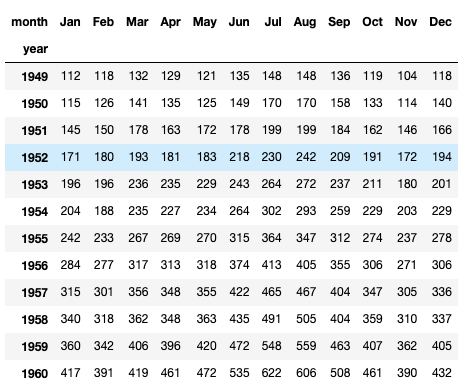
Now the most important question is why there is pivot and a pivot_table in pandas. The reason is that pivot only reshapes the data, it does not support data aggregation, for data aggregation you will have to use pivot_table.
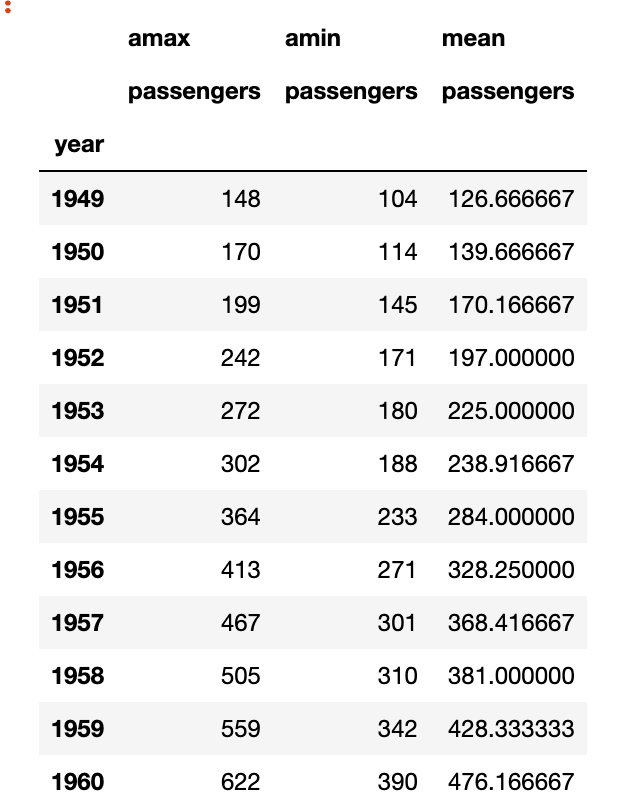
Now suppose I wanted to create a table which will show me for every year, what was the maximum, minimum and mean number of passengers, then there are two ways I can do it, I can either use groupby or I can use pivot_table. Here is the official documentation from pandas for pivot_table. Note: You can pass multiple aggregation functions.
DataFrame.pivot_table(values=None, index=None, columns=None, aggfunc='mean', fill_value=None, margins=False, dropna=True, margins_name='All', observed=False, sort=True)
flights.pivot_table(values = 'passengers', index = 'year', aggfunc=[np.max, np.min, np.mean])
Melt
Melt is used to convert wide-form data into long-form, suppose we started with the flights data in its pivot form, that is –
flights_wide = flights.pivot(index='year', columns='month', values='passengers')
And we wanted to return to the flights data form, then melt can be thought of as the unpivot of pandas. To return to the original form you simply have to –
flights_wide.melt(value_name='passengers', ignore_index=False)
Here we don’t use an id_var as there is None, we add ignore_index as False as we want to return the index which has the year in it and we call the value_name as passengers.

As a recap, remember that pivot makes long-form data into wide-form and melt takes wide-form data and converts it into long-form data
So where is Cast in Pandas?
People who have used R as a programming language often ask where is the cast functionality in pandas, the pivot_table we saw earlier is pandas’s answer to the cast functionality in Python.
 ML EXPLAINED
Leave a comment