Suppose you want to calculate aggregated count features and add them to your data frame as a feature. What you would typically do is, create a grouped data frame and then do a join. What if you can do all that in just one single line of code. Here you can use the transform functionality in pandas.
import numpy as np
import pandas as pd
import seaborn as sns
df = sns.load_dataset('titanic')
df.head()

Using df['cnt_class_town'] = df.groupby(['class', 'embark_town']).transform('size') we can directly get our desired feature in the data frame.
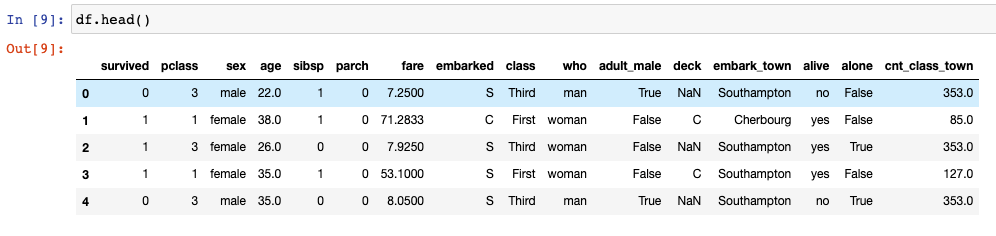
Again, if you want to create any sort of binned features based on the quantiles, usually first you would create a function and then use pandas apply to add that bucket to your data. Here again, you can directly use qcut functionality from pandas, pandas.qcut(x, q, labels=None, retbins=False, precision=3, duplicates='raise') to create the buckets in just one line of code.
Let’s take an example where we want to bin the age column into 4 categories, we can do so by running this one line of code –
df['age_bucket'] = pd.qcut(df['age'], q = [0,0.25,0.5,0.75, 1], labels = ["A", "B", "C", "D"])
Do note that the labels have to be 1 less than your quantiles (q). The explanation as to why I have explained in the Youtube video (see above).
Hopefully, this clears up some pandas concepts and lets you write faster and neater code.
 ML EXPLAINED
Leave a comment