Category: ML Basics

  • An Illustrated Guide to Gradient Descent

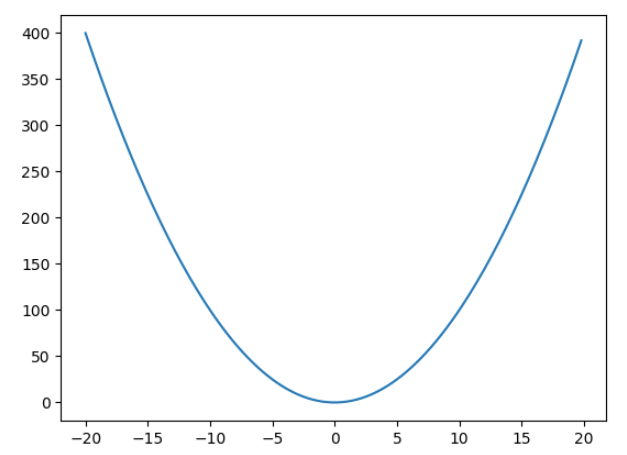
    How will you minimise this function –

    f(x) = x^{2}

    The mathematical solution will be to find the derivative, then solve the equation, \frac{\partial f(x)}{\partial x} = 2x = 0, which gives the solution as x = 0. But what if you don’t know this and need to rely on a method which can reach the minimum of a function iteratively. That is what gradient descent does.

    Gradient descent as the name suggests is like slowly descending down the mountain that is the loss function but in an iterative manner. We always take a small step in the opposite direction of the gradient. If the gradient is positive, we take a negative step and if the gradient is negative then we take a positive step.

    So in this example suppose we have to minimise x^{2} and we start off with an initial value say 7. Then we we will update the value of x as –

    x_new = x_old + (-\frac{\partial f(x)}{\partial x})*x_old*lr

    where lr is the learning rate. Tuning this value is crucial is how fast we reach the minimum, or if we overshoot the minimum and never reach it.

    Let’s take an example in python –

    import matplotlib.pyplot as plt
    import matplotlib.animation as animation
    import numpy as np

    def f(x):
    return x**2

    def derivative(x):
    return 2*x

    y = [f(x) for x in np.arange(-20,20,0.2)]
    x = np.arange(-20,20,0.2)

    plt.plot(x,y)
    value = 7
    lr = 0.1
    derivatives = []
    values = []
    for i in range(9):
    values.append(value)
    derivatives.append(derivative(value))
    value = value - lr*derivative(value)

    # List of points and derivatives
    points = [(x,f(x)) for x in values]

    # Create a 9x9 subplot grid
    fig, axs = plt.subplots(3, 3, figsize=(9, 9))


    # Plot the main plot (x^2) in the top-left subplot
    axs[0, 0].plot(x, y, label='$x^2$', color='blue')
    axs[0, 0].legend()

    # Iterate over points and derivatives to create subplots
    for i, (point_x, point_y) in enumerate(points):
    # Calculate the line passing through the point with the slope from the derivatives list
    slope = derivatives[i]
    line_y = x + slope * (x - point_x)

    axs[i//3, i%3].plot(x, y, color='blue')

    # Plot the point
    axs[i//3, i%3].plot(point_x, point_y, marker='x', markersize=10, color='red', label='Point')

    # Plot the line passing through the point with the specified slope
    axs[i//3, i%3].plot(x, line_y, linestyle='--', color='green', label=f'Slope = {slope}')

    # Set titles for subplots
    axs[i//3, i%3].set_title(f'Point at ({np.round(point_x,2)}, {np.round(point_y,2)})')

    # Adjust layout for better visualization
    plt.tight_layout()

    # Show the plot
    plt.show()
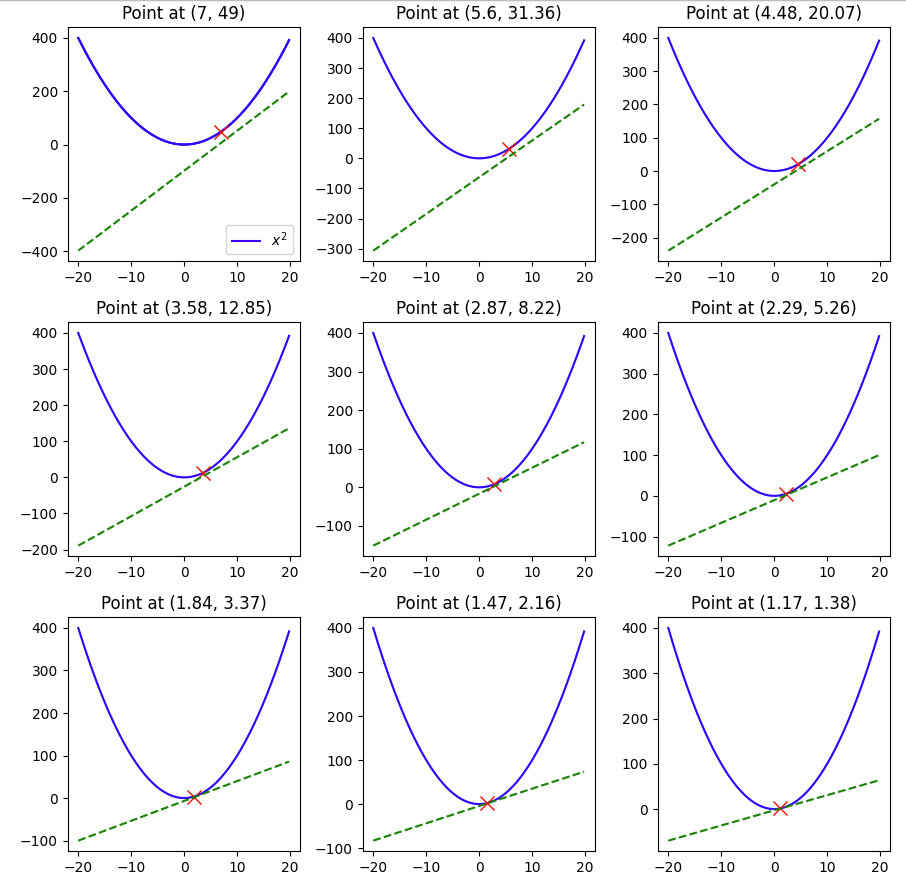
    Here we see that with a learning rate of 0.1 and a starting value of 7 and in 9 steps we were able to reach 1.17, pretty close to the minimum of 0, but not quite so, if we change the lr to 0.3, let’s see what happens.

    The minimum of 0 was reached within 9 steps.

    But what happens if we make the lr 1 –

    Here you can see that the value keeps oscillating between 7 and -7, and thus having a large learning rate also can be harmful when using ML models that use gradient descent.

    Hopefully this example gave you a visual guide on how gradient descent works.

  • Deploy Machine Learning Model on Spaces by HuggingFace Using Gradio

    Deploy Machine Learning Model on Spaces by HuggingFace Using Gradio

    Once your Gradio application is ready and tested in the notebook, then the next thing you need to do is deploy it using spaces.

    In this demo example, we will deploy the Titanic model using spaces. You can visit the space here. There are only 4 steps involved –

    1. Create a new space – We will call this space titanic_demo, you can also use paid GPU instances if required.

    2. Create app.py – Here lies the code which runs the Gradio application. Below is the code used to run the space.

    import numpy as np
    import pandas as pd
    import gradio as gr
    from catboost import CatBoostClassifier
    
    clf = CatBoostClassifier()
    clf.load_model("./titanic_model.bin")
    
    def predict(pclass:int = 3,
                sex:str = "male",
                age:float = 30,
                fare:float = 100,
                embarked:str = "S"):
      prediction_array = np.array([pclass, sex, age, fare, embarked])
      survived = clf.predict(prediction_array)
      if survived == 1:
        return f"The passenger survived"
      else:
        return f"The passenger did not survive"


    with gr.Blocks() as demo:
      # Keeping the three categorical feature input in the same row
      with gr.Row() as row1:
        pclass = gr.Dropdown(choices=[1,2,3], label= "pclass")
        sex = gr.Dropdown(choices =["male", "female"], label = "sex")
        embarked = gr.Dropdown(choices =["C", "Q", "S"], label = "embarked")
      # Creating slider for the two numerical inputs and also defining the limits for both
      age = gr.Slider(1,100, label = "age", interactive = True
      )
      fare = gr.Slider(10,600, label = "fare", interactive = True
      )
    
      submit = gr.Button(value = 'Predict')
    
      # Showing the output
      output = gr.Textbox(label = "Whether the passenger survived ?", interactive = False,)
    
      # Defining what happens when the user clicks the submit button
      submit.click(predict, inputs = [pclass,sex, age,fare,embarked], outputs = [output])
    
    demo.launch(share = False, debug = False)

    Remember to make share=False, as in spaces you don’t need to create a shareable link.

    3. Create requirements.txt (optional )- This is optional in case you’re not using packages not pre-loaded into the space. We’re using catboost as the model, so we will specify the requirements.txt file

    4. Add your model file (optional ) – This is again optional as your ML application might not involve loading from a saved model file. Here we’ve stored our titanic model in a bin file, so we add it to the files.

    That’s it. Once you’ve followed these steps your ML model is up and running on Spaces and you don’t have to worry about the link expiring.

  • Understanding R-squared (R2) in Regression: A Comprehensive Explanation of Model Fit

    In the realm of regression analysis, one of the key metrics used to evaluate the goodness-of-fit of a model is the R-squared (R2) statistic. R-squared serves as a crucial tool for quantifying how well a regression model captures the variation in the dependent variable based on the independent variables. In this blog, we will delve into the concept of R-squared, its interpretation, calculation, and its strengths and limitations in assessing the performance of regression models.

    R^{2}=1- \frac{RSS}{TSS}

    But what do RSS and TSS mean?

    RSS is also called the residual sum of squares. It is calculated by the formula –

    RSS = \sum(y - \hat{y})^{2}

    So it is the sum of the squared difference between the predicted value and the actual value.

    Plotting this on the graph will look like this.

    Here we can see that the vertical lines are the residuals, and squaring and adding up these values will give us the RSS.

    Similarly, the TSS is given by the formula –

    TSS = \sum(y - \bar{y})^{2}

    Here we can see the error with respect to \bar{y}.

    But why is R^{2} = 1 -\frac{RSS}{TSS} ?

    The answer is very logical if you think. The simplest estimate of the predicted value is the mean. So if \hat{y} = \bar{y}, then RSS = TSS and your R-squared value becomes 0. On the other hand, if your regression line fits perfectly, i.e. \hat{y} = y, the RSS = 0, and R-squared becomes 1.

    So that’s why R-squared is a goodness of fit measurement, and its value is always between 0 and 1.

  • Huber Loss – Loss function to use in Regression when dealing with Outliers

    Huber Loss – Loss function to use in Regression when dealing with Outliers

    Huber loss, also known as smooth L1 loss, is a loss function commonly used in regression problems, particularly in machine learning tasks involving regression tasks. It is a modified version of the Mean Absolute Error (MAE) and Mean Squared Error (MSE) loss functions, which combines the best properties of both.

    Below are some advantages of Huber Loss –

    1. Robustness to outliers: One of the main advantages of Huber loss is its ability to handle outliers effectively. Unlike Mean Squared Error (MSE), which heavily penalizes large errors due to its quadratic nature, Huber loss transitions to a linear behaviour for larger errors. This property reduces the impact of outliers and makes the loss function more robust in the presence of noisy data.
    2. Differentiability: Huber loss is differentiable at all points, including the transition point between the quadratic and linear regions. This differentiability is essential when using gradient-based optimization algorithms, such as Stochastic Gradient Descent (SGD), to update the model parameters during training. The continuous and differentiable nature of the loss function enables efficient optimization.
    3. The balance between L1 and L2 loss: Huber loss combines the benefits of both Mean Absolute Error (MAE) and MSE loss functions. For small errors, it behaves similarly to MSE (quadratic), which helps the model converge faster during training. On the other hand, for larger errors, it behaves like MAE (linear), which reduces the impact of outliers.
    4. Smoother optimization landscape: The transition from quadratic to linear behaviour in Huber loss results in a smoother optimization landscape compared to MSE. This can prevent issues related to gradient explosions and vanishing gradients, which may occur in certain cases with MSE.
    5. Efficient optimization: Due to its smoother nature and better handling of outliers, Huber loss can lead to faster convergence during model training. It enables more stable and efficient optimization, especially when dealing with complex and noisy datasets.
    6. User-defined threshold: The parameter δ in Huber loss allows users to control the sensitivity of the loss function to errors. By adjusting δ, practitioners can customize the loss function to match the specific characteristics of their dataset, making it more adaptable to different regression tasks.
    7. Wide applicability: Huber loss can be applied to a variety of regression problems across different domains, including finance, image processing, natural language processing, and more. Its versatility and robustness make it a popular choice in many real-world applications.

    While there are also some disadvantages of using this loss function –

    1. Hyperparameter tuning: The Huber loss function depends on the user-defined threshold parameter, δ. Selecting an appropriate value for δ is crucial, as it determines when the loss transitions from quadratic (MSE-like) to linear (MAE-like) behaviour. Finding the optimal δ value can be challenging and may require experimentation or cross-validation, making the model development process more complex.
    2. Task-specific performance: Although Huber loss is more robust to outliers compared to MSE, it might not be the best choice for all regression tasks. The choice of loss function should be task-specific, and in some cases, other loss functions tailored to the specific problem might provide better performance.
    3. Less emphasis on smaller errors: The quadratic behavior of Huber loss for small errors means that it might not penalize small errors as much as the pure L1 loss (MAE). In certain cases, especially in noiseless datasets, the added robustness to outliers might come at the cost of slightly reduced accuracy in predicting smaller errors.

    Let’s see Huber Regression in Action and see how it is different compared to Linear Regression

    import numpy as np
    from sklearn.linear_model import HuberRegressor, LinearRegression
    from sklearn.datasets import make_regression
    import seaborn as sns
    sns.set_theme()
    rng = np.random.RandomState(0)
    X, y, coef = make_regression(n_samples=200, n_features=2, noise=4.0, coef=True, random_state=0)
    
    #Adding outliers
    X[:4] = rng.uniform(10, 20, (4, 2))
    y[:4] = rng.uniform(10, 20, 4)
    
    #plotting the data 
    
    sns.scatterplot(x = X[:,1], y = y)
    sns.scatterplot(x = X[:,0], y = y)

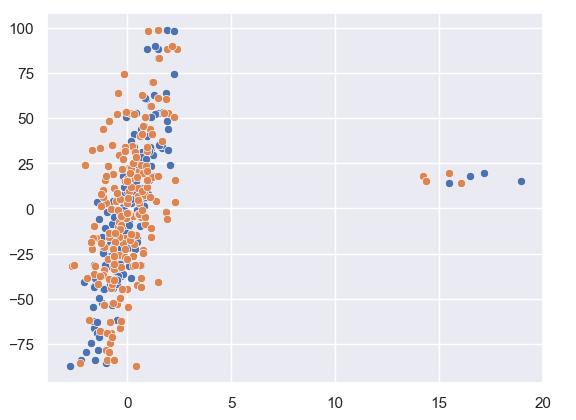
    As we can see from our data plotted that there are a few outliers in this.
    Let us see how Huber Regression and Linear Regression perform.

    huber = HuberRegressor().fit(X, y)
    
    lr = LinearRegression()
    lr.fit(X,y)
    
    print(f'True coefficients are {coef}')
    >>>True coefficients are [20.4923687  34.16981149]
    print(f'Huber coefficients are {huber.coef_}')
    >>>Huber coefficients are [17.79064252 31.01066091]
    print(f'Linear coefficients are {lr.coef_}')
    >>>Linear coefficients are [-1.92210833  7.02266092]

    Here we can see that the Huber coefficients are closer to the true coefficients, let us also visualise this by plotting the line.

    # use line_kws to set line label for legend
    
    fig, axes = plt.subplots(nrows=1, ncols=2, figsize=(10, 5))
    sns.regplot(x=X[:,1], y=y, color='b', 
     line_kws={'label':"y={0:.1f}x+{1:.1f}".format(huber.coef_[1],huber.intercept_)}, ax = axes[0])
    axes[1] = sns.regplot(x=X[:,1], y=y, color='r', 
     line_kws={'label':"y={0:.1f}x+{1:.1f}".format(lr.coef_[1],lr.intercept_)}, ax = axes[1])

    In these plots, we can clearly see the effect the outlier has on the regression output between Linear and Huber Regression.

  • Understanding Naive Bayes – A simple yet powerful ML Model Part 1 – Bayes Theorem

    Naive Bayes is often not given enough credit, people when learning about ML often directly start using XgBoost or Random Forest models. While these models are good and will often achieve the task, we should also know about Naive Bayes, a Bayesian ML model, which was once used in production by tech giants like Google.

    But before we deep dive into Naive Bayes, we’ve to learn about the Bayes theorem itself.

    P(A/B) = \frac{P(B/A)*P(A)}{P(B)}

    It may seem daunting, but at its core, the formula is very simple to understand, all it provides is a way to calculate the probability of A given B has already happened. It is equal to the probability of B given that A has already happened multiplied by the probability of A divided by the probability of B happening.

    You might be daunted by mathematical jargon such as posterior and priors, but if you think in these simple terms then it is a very simple formula.

    Let’s take an example, and suppose that we don’t know Bayes theorem.

    We are told that a coin could be fair, or biased (always comes up heads). We observe two heads in a row and we have to find the probability that the coin being tossed is a fair coin.

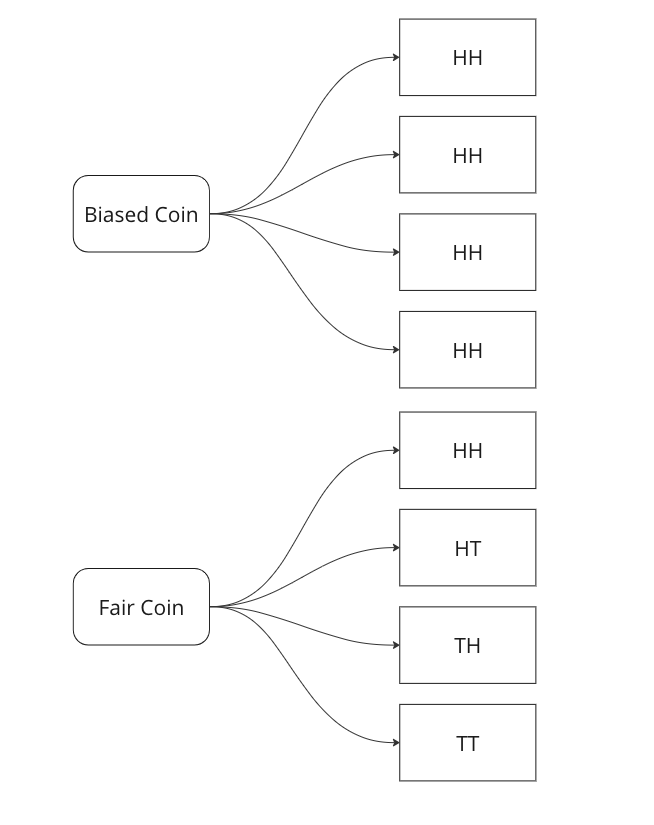
    Graphing all outcomes of two coin tosses by both a fair and a biased coin. Now we know that two heads came in a row. So we update our sample space with this given information.

    Here we can see that we can only attribute 1 sample out of 5 to a fair coin, so P(fair coin/HH) = 1/5. In a similar way, we can say P(biased coin/HH) = 4/5 as we can attribute 4 out of 5 sample points to the biased coin.

    Let us see if we can arrive on the same answer by using the Bayes Formula.

    P(fair coin/HH) = \frac{P(HH/fair coin)*P(fair coin)}{P(HH)} = \frac{1/4*1/2}{1*1/2+1/2*1/4}=1/5

    Breaking down the calculations –

    1. P (HH/fair coin) = 1/4 – we saw above that in 1/4 cases a fair coin will give two heads
    2. P ( fair coin) = 1/2 – we know that a coin could be biased or fair, this is what is known as a prior, here it is equally likely that the coin could be biased or fair.
    3. P (HH) = 1/2*1 + 1/2*1/4 – This is where most of the confusion rises related to Bayes theorem. We have to calculate the probability of getting two heads, considering both scenarios. In the case of a biased coin, it will always gives head, so the probability is 1. There is also half a chance to select it, so we multiply it by 0.5. Similarly, we know 1/4 is the probability to get HH with a fair coin, and there is 0.5 probability to select it.

    In the next part we will see how we can use this to create a very basic classifier in Python.