In the Dev Conference, OpenAI announced the GPT-4 Vision API. With access to this one can develop many tools, with the GPT-4-turbo model being the engine of your tool. The use cases can range from information retrieval to classification models.
In this article, we will go over how you can use the vision API, how can you pass multiple images with the API and some tricks you should be using to improve the response.
Firstly, you should have a billing account with OpenAI and also some credits to use this API, as, unlike ChatGPT, here you’re charged per token and not a flat fee, so be careful in your experiments.
The API –
The API consists of two parts –
- Header – Here you pass your authentication key and if you want the organisation id
- Payload – This is where the meat of your request lies. The image can be passed either as a URL or a base64 encoded image. I prefer to pass it in the latter way.
# To encode the image in base64

# Function to encode the image
def encode_image(image_path):
    with open(image_path, "rb") as image_file:
        return base64.b64encode(image_file.read()).decode('utf-8')

# Path to your image
image_path = "./sample.png"

# Getting the base64 string
base64_image = encode_image(image_path)
Let’s look at the API format
headers = {
    "Content-Type": "application/json",
    "Authorization": f"Bearer {API_KEY_HERE}"
}

payload = {
    "model": "gpt-4-vision-preview",
    "messages": [
         {"role": <user or system>,
          "content" : [{"type": <text or image_url>,
                        "text or image_url": <text or image_url>}]
}
    ],
    "max_tokens": <max tokens here>
}

response = requests.post("https://api.openai.com/v1/chat/completions", headers=headers, json=payload)
Let’s take an example.
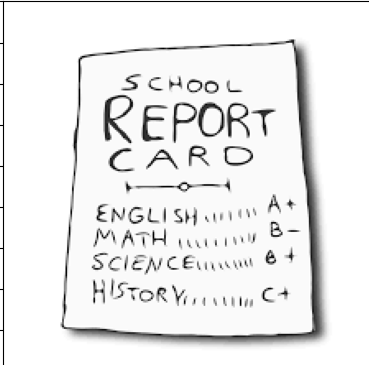
Suppose I want to create a prompt which has a system prompt and a user prompt which can extract JSON output from an image. My payload will look like this.
payload = {
    "model": "gpt-4-vision-preview",
    "messages": [
# First define the system prompt
{
        "role": "system",
        "content": [
            {
                "type": "text",
                "text": "You are a system that always extracts information from an image in a json_format"
            }
        ]
    },

    # Define the user prompt
      {
        "role": "user",
# Under the user prompt, I pass two content, one text and one image
        "content": [
          {
            "type": "text",
            "text": """Extract the grades from this image in a structured format. Only return the output.
                       ```
                       [{"subject": "<subject>", "grade": "<grade>"}]
                       ```"""
          },
          {
            "type": "image_url",
            "image_url": {
              "url": f"data:image/jpeg;base64,{base64_image}"
            }
          }
        ]
      }
    ],
    "max_tokens": 500 # Return no more than 500 completion tokens
}
The return I get from the API is exactly how i wanted.
```json
[
  {"subject": "English", "grade": "A+"},
  {"subject": "Math", "grade": "B-"},
  {"subject": "Science", "grade": "B+"},
  {"subject": "History", "grade": "C+"}
]
```
This is just an example of how just by using the correct prompt we can built an information retrieval system on images using the vision API.
In the next article, we will build a classifier using the API, which will involve no knowledge of Machine Learning and just by using the API we will build a state-of-the-art image classifier.
 ML EXPLAINED